
Turning your iMac screen into a touchscreen is now possible thanks to a frame designed for this purpose.
When comparing computers on Windows and Mac OS X, many prefer Macs for the simplicity, elegance and above all the security they offer: that’s why, when it comes to choosing An all-in-one computer, iMacs make a lot of people happy – even if the price is sometimes is a bit high.
In recent years, Windows PC vendors have renewed their product line to offer computers that offer multitouch capability as standard on their screens.
Unfortunately for Apple fans dreaming of a touch-sensitive iMac, it seems that this company does not really want to offer this feature which, although it may seem superfluous to some, could, however, make proud service to others.
Zorro Macsk, the framework that makes the iMac Touchscreen

As pointed out in the previous paragraph, Mac OS X is not traditionally tactile.
And according to Phil Schiller, vice president of marketing at Apple Inc., it may even be the case because the use of such a machine would be anything but comfortable.
But it should be noted that like many users, the manufacturers of accessories do not necessarily share this opinion.
This is shown by the Chinese manufacturer Lumiaview with its product Zorro Macsk, a framework to create a touchscreen on iMac 21.5 and 27 inches.
Henceforth, no need to try to replace the panel of the screen to expect a touch iMac.
Just install the Zorro Macsk frame on the screen of its iMac and voila. It behaves like a trackpad so that all the gestures usually used on the trackpad are compatible.
How does Zorro Macsk work?
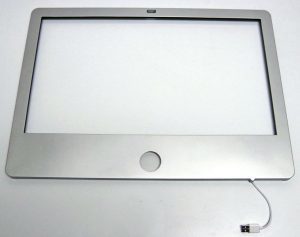
Zorro Macsk is a frame that magnetically attaches to 21.5 and 27-inch iMac screens, making them tactile and multi-touch.
Its operation is based on an infrared system. Indeed, diodes have been arranged all around Zorro Macsk and generate a beam.
When one interrupts said beam by touching the screen or even touching it, a point of contact is detected and considered as a click at the precise location.
The Zorro Macsk installs very easily, in just a few seconds. Just place Zorro Macsk on the iMac screen (it attaches magnetically) and then connect it to USB on the back of the screen. 10 seconds later, the system is ready to use.
It can be removed just as easily if you want to stop using it.